mic-test-bench: a free measurement bench for microphones
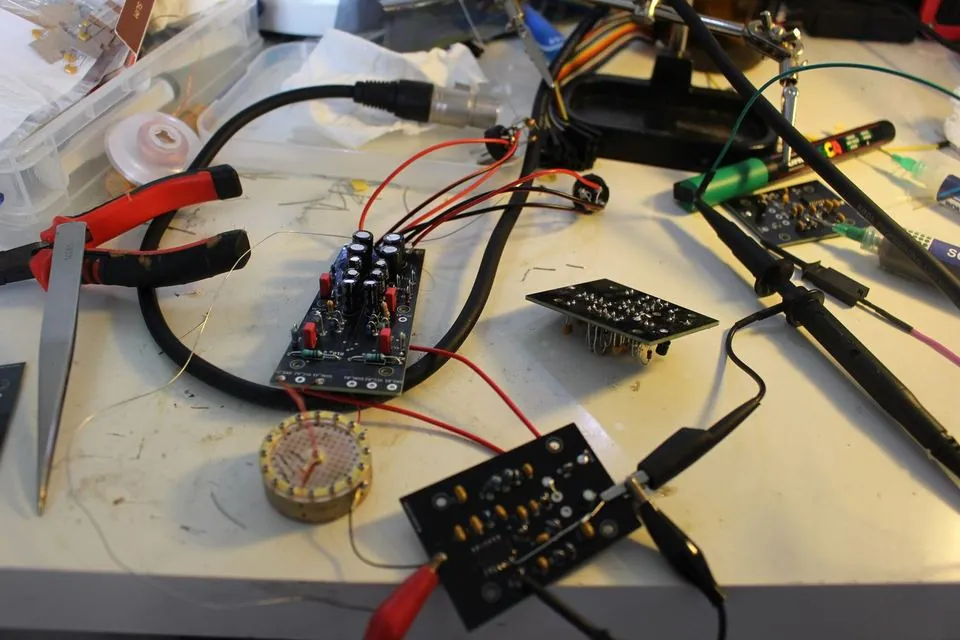
To know what a microphone you built or repaired is worth, you have to measure it, and without a lab the safest method is to compare it with a microphone you know. mic-test-bench does exactly that: it records the microphone under test and a reference microphone at the same time, on the same interface, while a loudspeaker plays the test signals. Then it computes every measurement and renders a report. We wrote it to measure the Talas One, our open-hardware condenser microphone, but nothing in it is tied to that microphone: a session manifest says which microphone is on which channel, with which hardware.
In short. A microphone under test, a reference microphone, a two-input interface, a loudspeaker. The bench produces a self-contained HTML report, with no server and no network, that gives each measurement its reliability level before the verdict: reliable, indicative or unreliable. Without calibration, the figures are relative to the reference. You can try the whole chain without any hardware, using a synthetic campaign.
1How it works
The microphone under test goes on input 1 of the interface, the reference on input 2, capsules side by side, and the same interface plays the signal through the loudspeaker. Each capture is a stereo WAV file: channel 1 is the microphone under test, channel 2 the reference. Because both microphones hear the same loudspeaker at the same moment, the loudspeaker’s response is in both channels and largely cancels in their difference.
The work is split in two. Capture and report rendering are written in Python. All the signal processing is in a Rust engine, talas-analyze, which writes every figure into a single file, report.json, with the CSV files behind every curve. The report only reads that file: there is one source for the figures. The command that runs the whole chain is talas-bench.
2What it measures
| Measurement and engine command | What you get |
|---|---|
Levels and relative sensitivitylevel | Level of each channel and the gain gap between the microphone under test and the reference, over 100 Hz – 10 kHz |
Frequency response, pink noisefr | The difference, microphone under test minus reference, by octave band: the robust measurement |
Frequency response, sine sweepfr-ess | Magnitude, phase, group delay, γ² coherence, polarity, impulse response, waterfall |
Self-noisenoise, guarded by noise-guard | A, C, Z, ITU-R 468 and CCIR weightings, third-octave bands, mains-line emergence, shape of the distribution |
Noise of the electronics alone, with a dummy capsulefalse-capsule | Noise in µV(A) and in equivalent dB(A), share of the mains lines, interface floor subtracted |
Distortionthd-tone, imd, report | THD and THD+N of a steady sine, curves against frequency and level, SMPTE and CCIF intermodulation |
Transient responsetransient | 10–90 % rise time, overshoot, settling, polarity and delay relative to the reference |
Directivitypolar | Directivity index, −6 dB beamwidth and front/back ratio per third-octave band |
Proximity effect, output impedance, thermal driftproximity, output-impedance, drift | A campaign of several captures for each |
Blind listeningab-prep | Two takes matched in loudness (ITU-R BS.1770), randomly assigned to A and B |
Some measurements need more than one capture. For directivity, you record one sweep per turntable angle, the angle written in the file name, with the reference fixed: it is what cancels a source that drifts between two positions. A marked protractor and a careful hand are enough for 15° steps. A dummy capsule replaces a diaphragm with a capacitor of the same value: the preamp sees the same impedance but hears nothing, and what comes out is the noise of the electronics. The bench also has tools for a small batch: a verdict per unit against a profile of limits, the deviation from a reference unit, and the Cp/Cpk of a batch.
3The hardware
- An audio interface with at least two inputs and one output, that plays and records at the same time, and that PortAudio can see. You choose it with
python3 measure.py --device <name or index>. - A reference microphone, on input 2. Its datasheet is useful: declared in the manifest, it lets the bench estimate the noise of the microphone under test in dB(A) SPL.
- A loudspeaker, on the interface’s output: it is the acoustic source. You monitor on headphones.
- 48 V phantom power on both inputs, for condenser microphones.
The bench was developed with an Audient iD14, a RØDE NT1-A as reference and an M-Audio BX5 loudspeaker. No other interface has been tried yet.
To go further, depending on the measurement: a 94 dB SPL acoustic calibrator and a true-RMS meter or an oscilloscope for absolute figures (dB SPL, mV/Pa); a calibrated measurement microphone, XLR or USB; a turntable or a protractor for directivity; a thermometer for drift; a measured resistor for output impedance.
4Installing
Tried on Fedora Linux 42 (x86_64) with Rust 1.94 and Python 3.13. You need Git, Rust 1.87 or later with cargo, and Python 3.11 or later with venv (on Debian and Ubuntu, the python3-venv package). For capture only, the PortAudio library (portaudio on Fedora, libportaudio2 on Debian and Ubuntu); analysing existing captures does not need it.
git clone https://codeberg.org/senke/mic-test-bench.git
cd mic-test-bench

# the Rust engine: a few minutes the first time
cargo build --release --offline --manifest-path talas-analyze/Cargo.toml

# the Python side, in its own environment
python3 -m venv .venv
. .venv/bin/activate
pip install -r requirements.lock.txt
The engine builds without network access: its dependencies ship with the repository. The Python packages come from PyPI and need a connection once, at install time. After that, generating signals, analysing and rendering the report work offline. Optional: Chrome or Chromium for a PDF of the report, PySide6 for the desktop window.
5Trying it without hardware
A synthetic campaign runs the whole chain, from capture to report, with no microphone and no interface. With the Python environment active:
# test signals: sweeps, pink noise, sines, clicks
python3 signals/gen_signals.py && python3 signals/gen_pro.py

# the synthetic campaign: 19 captures, about 35 MB, and its manifest
python3 demo/gen_demo.py

# analysis and report, in English
./talas-bench captures/demo --manifest captures/session.demo.json \
              --inv captures/demo_inverse.wav --lang en
Then open resultats/demo/report.html. Next to it are report.json, the single source of the report’s figures, and the CSV files behind every curve. Leave out --lang en for a French report.
The synthetic captures carry characteristics measured on the first Talas One prototype in June 2026, so the report has realistic shapes to show. It is a test of the chain, not a measurement of a real microphone; below 250 Hz the reproduction stays imperfect, and the repository explains why in demo/LISEZMOI.md.
6Measuring a real microphone
First, match the gains. The two microphones do not have the same sensitivity. Record the same source, pink noise through the loudspeaker, and adjust the input gains until they are within 0.5 dB:
TA="${CARGO_TARGET_DIR:-talas-analyze/target}/release/talas-analyze"
python3 measure.py measure signals/pink.wav appariement
$TA level captures/appariement_*.wav
Note the knob positions and leave them alone for the whole session. Put the two capsules as close together as possible, grilles side by side, at the same distance and on the same axis to the loudspeaker, about 1 m away for frequency response, in the deadest room you have, ideally at night.
Then the whole campaign, followed by analysis and report:
./campagne_pro.sh my-mic         # captures in captures/my-mic/
./talas-bench captures/my-mic --manifest captures/session.example.json \
              --inv signals/sweep_inverse_long.wav --lang en
With CALME=1 ./campagne_pro.sh my-mic, the campaign plays only the silence, the gain matching, the pink noise and the sweep, at speaking level, in about a minute and a half per microphone. It skips the loud steps: at moderate level they mostly measure the loudspeaker, and distortion is better measured by electrical injection. Each measurement can also be run on its own with its engine command; docs/measuring.md takes them in order, with the wiring and the placement.
For a self-noise figure you intend to publish, ./campagne_bruit.sh records pink noise, silence, then pink noise again, and refuses the session if the gains moved in between, if the room is audible in both microphones, or if the interface floor is too close.
If you prefer a window: ./talas-bench ui (it needs PySide6), then Tout tester (“test everything”), which runs the same chain. Its labels are in French.
7Reading the report
The report is a single HTML file, with no server, no network and no external resource. Its charts are interactive: hover for the exact value, click to pin, drag to zoom. It comes in English and in French.
- Reliability comes first. Every section carries a level: reliable, indicative or unreliable, set from objective gates such as the coherence between the two microphones, gain matching, capsule placement or a night-time measurement. An unreliable measurement gives no performance conclusion, at most a sign or a shape.
- A difference is not automatically a defect. The report sorts what it finds into three categories: a defect of the microphone, to be fixed; character, a tonal signature rather than a grade; an artefact, an effect of the setup or the method.
- The bench refuses rather than guesses. No THD at 50 or 100 Hz under 50 Hz mains, because the harmonics land on the mains lines; no directivity index below 150° of angular coverage; no thermal drift slope over a span under 5 °C.
Two reports can be compared with each other, for instance before and after a rework. What every figure means is in docs/metrics.md.
8An example: the Talas One
These are measurements made with this bench on a single unit, the first Talas One P3, in November 2026, in an untreated living room, against the same NT1-A. They show what the bench can say; they are neither a datasheet nor a guarantee.
- ±1.5 dBresponse deviation from the NT1-A, 70 Hz to 4 kHz
- +6.8 dBsensitivity against the NT1-A, channel A: ≈ 55 mV/Pa from the NT1-A’s published 25 mV/Pa
- ≈ 5 dB(A)noise of the electronics alone, channel A, dummy capsule, ±2 dB
The ±2 dB of the last figure comes from the sensitivity, which is relative to the NT1-A’s datasheet: without a calibrator, a dB(A) figure inherits that uncertainty. The details, the method and what remains to be measured are in the P3 measurements on Codeberg, and the dummy-capsule measurement is told step by step in our page on self-noise.
9Limits
- Relative, unless calibrated. Without a calibrator or a measurement microphone, differences and percentages can be trusted, absolute levels cannot. A 94 dB calibrator and an input calibration give dB SPL and mV/Pa; a calibration profile is valid only at the gain setting it was made at. The procedure is in docs/calibration.md.
- The room matters. It does not cancel as neatly as the loudspeaker: the two capsules are not exactly in the same place, and reflections reach them differently. Distortion measured acoustically includes that of the loudspeaker and the room.
- Little hardware tried. One interface, the Audient iD14, and Linux only; macOS and Windows have not been tried.
- The dummy capsule. The guided procedure,
bruit_fausse_capsule.py, is written for the Talas One and the iD14; the computation,talas-analyze false-capsule, takes the sensitivity, the dummy’s capacitance and the gain as options, but its capacitance correction comes from a simulation of the Talas One’s preamp. - Language. The desktop window is in French, most guides in English, and a few procedures in French only.
- No batch yet. The production tools exist, but no multi-unit measurement has been made with them yet. Batch capability is withheld below 20 units.
10Licence and source code
The code, Rust engine, Python, scripts and report templates, is under the AGPL-3.0-only. The published measurement data, WAV captures, manifests, the CSV and JSON of the example report, are under CC0 1.0: do what you like with them. The documentation is under CC BY-SA 4.0.
The repository is on Codeberg: codeberg.org/senke/mic-test-bench. Questions, bug reports and pull requests are welcome in its issues; CONTRIBUTING.md covers the build, the tests and the rules, including this one: no measurement computed in Python, and every new computation gets a test on a signal whose response is known in advance.